


Wydawcy
Katalog tematyczny
- Archeologia (109)
- Ekonomia, finanse, business (13704)
- Filozofia (1445)
- Historia (3040)
- Języki i językoznawstwo (2356)
- Lifestyle, hobby i rozrywka (475)
- Medycyna (9704)
- Nauki humanistyczne (4)
- Nauki o Ziemi i środowisku (2638)
- Nauki ścisłe (20412)
- Nauki społeczne (8486)
- Nauki techniczne (13450)
- Prawo (1696)
- Publikacje informacyjne i interdyscyplinarne (1288)
- Religia i wierzenia (917)
- Technika komputerowa (4067)
- Bazy danych (75)
- Bezpieczeństwo komputerowe (454)
- Certyfikacja komputerowa (1)
- Grafika i media cyfrowe (32)
- Informatyka (779)
- Komputery, ogólnie (74)
- Programowanie (351)
- Programy komercyjne (49)
- Sieci komputerowe (350)
- Sprzęt komputerowy (4)
- Systemy operacyjne (32)
- Technika cyfrowa na co dzień (7)
- Zdrowie, relacje międzyludzkie i rozwój osobisty (657)





Informacje szczegółowe o książce
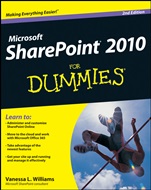
SharePoint 2010 For Dummies
ISBN 9781118273814
Autor: Vanessa L. Williams
Wydawca: Wiley
Dostępność: 3-6 tygodni
Cena: 162,75 zł
Przed złożeniem zamówienia prosimy o kontakt mailowy celem potwierdzenia ceny.
ISBN13: |
9781118273814 |
ISBN10: |
1118273818 |
Autor: |
Vanessa L. Williams |
Oprawa: |
Paperback |
Rok Wydania: |
2012-07-06 |
Numer Wydania: |
2nd Edition |
Ilość stron: |
504 |
Wymiary: |
238x192 |
Tematy: |
US |
Find out just how easy it is to create and launch a SharePoint site to be more productive There′s so much you can do with SharePoint, but where do you begin? With this friendly guide, of course! Whether you want to share documents with coworkers, create a public–facing site, customize your design, enable searchable information, or leverage Office 365, SharePoint pro Vanessa Williams will help you get the most out of this powerful tool. Put on your explorer′s cap — take a trip inside SharePoint to discover how to best manage projects, network with employees, utilize business intelligence, and access applications Make it a team effort — find out how to make your team site more effective by applying metadata to your documents, adding different files, and boosting security Put on your webmaster hat — build your skills to use SharePoint to host publicly facing sites and internal informational portals Add some spice — whether you want to change the color scheme of your pages or create a completely branded public website, learn how to make it look polished Find it fast — follow steps to use metadata to make it easier to search for your content Open the book and find: Tips for leveraging Office 365 and SharePoint Online Advice on using page templates How to populate your site with content Directions for taking your site live Details on sharing and collaborating on documents Steps for creating branded portals How to create custom style sheets to get the look you want Ways to take advantage of SharePoint′s business intelligence capabilities Learn to: Administer and customize SharePoint Online Move to the cloud and work with Microsoft Office 365 Take advantage of the newest features Get your site up and running and manage it effectively
Introduction 1 Part I: Collaborating with Team Sites 9 Chapter 1: Getting to Know Your Team Site 11 Chapter 2: Sharing Your Documents 25 Chapter 3: Working with Lists 45 Chapter 4: Getting a New View 61 Chapter 5: Subscribing to Feeds and Alerts 81 Chapter 6: Working Offline with SharePoint Workspace 91 Part II: Taking Your Team Site to the Next Level 103 Chapter 7: Creating New Sites 105 Chapter 8: Working with Web Pages 119 Chapter 9: Working with Web Parts 131 Chapter 10: Configuring Libraries and Lists 147 Chapter 11: Creating Custom Lists 165 Chapter 12: Creating Forms and Workflows 181 Chapter 13: Securing Your Team Site 193 Chapter 14: Changing the Look and Feel of Your Site 211 Part III: Building Communities 233 Chapter 15: Managing Your User Profile 235 Chapter 16: Using My Site Effectively 241 Chapter 17: Yours, Mine, and Ours: Social Networking 249 Part IV: Portals and Extranets 267 Chapter 18: Getting Started with Portals and Web Sites 269 Chapter 19: Approving Content for Publication 283 Chapter 20: Creating Page Layouts with SharePoint Designer 299 Chapter 21: Rolling Up Content to the Home Page 321 Chapter 22: Configuring Site Navigation 335 Chapter 23: Creating a Public Web Site in SharePoint Online 347 Chapter 24: Creating a Client Portal in SharePoint Online 359 Part V: Managing Enterprise Content 371 Chapter 25: Content Types and Metadata 373 Chapter 26: Exploring Enterprise Search 391 Chapter 27: Archiving Documents and Records 403 Part VI: Exploring Enterprise Services 415 Chapter 28: Business Intelligence in SharePoint 417 Chapter 29: Business Connectivity Services 427 Chapter 30: Deciding Between On–Premise and Office 365 437 Part VII: The Part of Tens 449 Chapter 31: Ten Governance Items 451 Chapter 32: Ten Ways to Master SharePoint 457 Index 463 Bonus Chapter 1: Managing Site Assets On the Web Bonus Chapter 2: Branding Your SharePoint Site On the Web Bonus Chapter 3: Access Services On the Web
Vanessa L. Williams has more than a decade of experience in information technology and information systems. As a freelance consultant, she helps clients ranging from small companies with 20 users to Fortune 200 enterprises using SharePoint to solve business problems.
Koszyk
Książek w koszyku: 0 szt.
Wartość zakupów: 0,00 zł
Informacje


Kontakt
Gambit
Centrum Oprogramowania
i Szkoleń Sp. z o.o.
Al. Pokoju 29b/22-24
31-564 Kraków
Siedziba Księgarni
ul. Kordylewskiego 1
31-542 Kraków
+48 12 410 5991
+48 12 410 5987
+48 12 410 5989
Subskrypcje
Administratorem danych osobowych jest firma Gambit COiS Sp. z o.o. Na podany adres będzie wysyłany wyłącznie biuletyn informacyjny.
Autoryzacja płatności

Informacje na temat autoryzacji płatności poprzez PayU.

© Copyright 2012: GAMBIT COiS Sp. z o.o. Wszelkie prawa zastrzeżone.
Projekt i wykonanie: Alchemia Studio Reklamy