


Wydawcy
Katalog tematyczny
- Archeologia (109)
- Ekonomia, finanse, business (13704)
- Filozofia (1445)
- Historia (3040)
- Języki i językoznawstwo (2356)
- Lifestyle, hobby i rozrywka (475)
- Medycyna (9704)
- Nauki humanistyczne (4)
- Nauki o Ziemi i środowisku (2638)
- Nauki ścisłe (20412)
- Nauki społeczne (8486)
- Nauki techniczne (13450)
- Prawo (1696)
- Publikacje informacyjne i interdyscyplinarne (1288)
- Religia i wierzenia (917)
- Technika komputerowa (4067)
- Bazy danych (75)
- Bezpieczeństwo komputerowe (454)
- Certyfikacja komputerowa (1)
- Grafika i media cyfrowe (32)
- Informatyka (779)
- Komputery, ogólnie (74)
- Programowanie (351)
- Programy komercyjne (49)
- Sieci komputerowe (350)
- Sprzęt komputerowy (4)
- Systemy operacyjne (32)
- Technika cyfrowa na co dzień (7)
- Zdrowie, relacje międzyludzkie i rozwój osobisty (657)





Informacje szczegółowe o książce
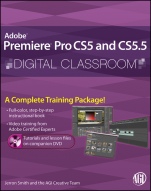
Premiere Pro CS5 and CS5.5 Digital Classroom: (Book and Video Training)
ISBN 9781118016176
Autor: Jerron Smith, AGI Creative Team
Wydawca: Wiley
Dostępność: 3-6 tygodni
Cena: 248,85 zł
Przed złożeniem zamówienia prosimy o kontakt mailowy celem potwierdzenia ceny.
ISBN13: |
9781118016176 |
ISBN10: |
1118016173 |
Autor: |
Jerron Smith, AGI Creative Team |
Oprawa: |
Paperback |
Rok Wydania: |
2011-08-05 |
Ilość stron: |
368 |
Wymiary: |
232x187 |
Tematy: |
US |
You have a personal tutor in the Digital Classroom
If you want expert instruction that fits into your schedule, the Digital Classroom series delivers. Expert instructors guide you through 11 lessons, helping you learn essential Premiere Pro CS5 and CS5.5 skills at your own speed. Full–color, step–by–step instructions in the book are enhanced with video tutorials on the DVD. With this Digital Classroom training package, you have your own private instructor showing you the easiest way to learn Premiere Pro.
Import video, audio, and still images to create engaging video projects
Add transitions and effects to liven up your videos
Create titles and integrate them into existing or new projects
Clean up and score audio using Adobe Soundbooth
Use Adobe Encore to author your projects to disk or the Web
A Complete Training Package!
Full–color, step–by–step instructional book
Video training from Adobe Certified Experts
Tutorials and lesson files on companion DVD
Spis treści:
Starting Up.
About Adobe Premiere Pro CS5 and CS5.5 Digital Classroom.
Prerequisites.
System requirements.
Starting Adobe Premiere Pro.
Resetting the Adobe Premiere Pro preferences.
Loading lesson files.
Opening Premiere Profiles in version CS5.5.
Locating missing media.
Working with the video tutorials.
Setting up for viewing the video tutorials.
Viewing the video tutorials with the Adobe Flash Player.
Additional resources.
Book series.
Training and Professional Development for Educators.
Resources for educators.
Lesson 1: Understanding Digital Video.
Starting up.
Understanding digital Non–linear Editing.
Understanding video settings.
Editing vs. delivery formats.
High definition vs. standard definition.
Progressive vs. interlaced.
Premiere Pro presets.
Overvie
w of the post production workflow.
Media acquisition.
Editorial development.
Graphics development.
Audio development.
Finishing.
Mastering.
Output and delivery.
Self study.
Review.
Lesson 2: Understanding the Workspace.
Starting up.
Understanding the Premiere Pro interface.
Understanding the default Editing workspace.
Understanding the tools.
Customizing the interface.
Opening, closing, and moving panels.
Creating custom workspaces.
Setting application preferences.
Using the Project panel.
Understanding media management.
Creating and organizing bins.
Modifying the Project panel display.
Locating missing media.
Self study.
Review.
Lesson 3: Making the Cut.
Starting up.
The cuts–only editing methodology.
A–roll vs. B–roll.
Cut–ins and Cut–aways.
Cutting on action.
Trimming clips in the Source Monitor.
Using multiple video tracks.
Adding and deleting tracks.
Renaming tracks.
Adding clips to the Timeline.
Trimming clips on the Timeline.
Using the Razor tool.
Making an Insert Edit.
Self study.
Review.
Lesson 4: Using Video Transitions.
Starting up.
Understanding video transitions.
Adding transitions to video clips.
Changing the time code display.
Preparing a clip to receive transitions.
Adding a transition between clips.
Editing transition settings.
Creating an image slideshow.
Self study.
Review.
Lesson 5: Working with Graphics.
Starting up.
Creating titles in Premiere Pro.
Using the Titler.
Creating a lower third.
Adding text to the Titler.
Formatting text boxes.
Formatting text.
Creating shapes.
Adding images to a title.
Saving a title style.
Creating a title overlay track.
Saving a title for later reuse.
Creating an ending credit roll.
Controlling the speed of a title roll.
Editing titles.
Working with Pho
toshop files.
Importing layered Photoshop files.
Animating the position of clips.
Animating the opacity of clips.
Self study.
Review.
Lesson 6: Using Video Effects.
Starting up.
What are video effects?
Applying video effects.
Creating a Black & White effect.
Animating the opacity of clips.
Adjusting the tonality of clips.
Working with Track Mattes.
Preparing the clip for a Track Matte.
Applying and editing the Track Matte Key effect.
Using the Ultra Keyer.
Creating a garbage matte.
Applying the Ultra Key.
Self study.
Review.
Lesson 7: Working with Audio.
Starting up.
Understanding digital audio.
Mono, stereo, and 5.1 surround sound.
Stripping audio from a video file.
Audio channel mapping.
Adding audio tracks to the Timeline.
Making a Three–Point Edit.
Setting volume keyframes.
Improving audio in Premiere Pro.
Self study.
Review.
Lesson 8: Advanced Editing Techniques.
Starting up.
Creating subclips.
Using Automate to sequence.
Making a Three–Point edit.
Setting an In Point on the Timeline.
Setting In and Out Points on a clip.
Ripple and Roll Edits.
Slip and Slide Edits.
Adjusting the clip speed.
Self study.
Review.
Lesson 9: Outputting Your Video.
Starting up.
Output for the Web and desktop.
Flash video and the Flash player.
Windows Media and the Silverlight player.
QuickTime video and the QuickTime player.
HTML5 Video.
Understanding formats and codecs.
Understanding temporal and spatial compression.
Understanding bit rate.
Understanding frame rate and resolution.
Understanding aspect ratio and pixel aspect ratio.
Progressive display vs. interlacing.
Exporting an H.264 file for mobile devices.
Creating a custom export preset.
Exporting with the Adobe Media Encoder.
Self study.
Review.
Lesson 10: Capturing and Transferring Footage
.
Starting up.
Creating a new project.
Creating a new sequence.
Creating a capture bin.
Capturing from a tape–based camera.
Transferring from a non–tape based camera.
Backing up a project with Project Manager.
Self study.
Review.
Lesson 11: Using Adobe Encore.
Starting up.
Understanding the DVD/Blu–ray/Flash authoring process.
Understanding DVD formatting.
Understanding Blu–ray formatting.
About the project.
Exporting an MPEG–2 DVD file.
Creating a new Encore project.
Using Adobe Dynamic Link in Encore.
Creating a Timeline.
Renaming chapter markers.
Organizing the Project panel.
Creating menus.
Linking buttons to chapter markers.
Linking menus with buttons.
Setting a fi rst play item.
Previewing a DVD.
Setting End and Override actions.
Outputting the project.
Self study.
Review.
Appendices.
Appendix A: The Premiere Pro Panels.
Appendix B: Adobe Premiere Pro Keyboard Shortcuts.
Appendix C: Premiere Pro Input and Output formats.
Appendix D: Recording Audio in Premiere Pro.
Appendix E: Cleaning up Audio in Adobe Soundbooth.
Appendix F: Premiere Pro CS5.5 New Features.
Nota biograficzna:
Jerron Smith is an animator, editor, and educator. He has worked with Adobe technologies for more than a decade. He teaches Web, interactive, and new media classes at American Graphics Institute.
The AGI Creative Team develops and delivers training programs for creative, marketing, and communications professionals through the American Graphics Institute.
Okładka tylna:
You have a personal tutor in the Digital Classroom
If you want expert instruction that fits into your schedule, the Digital Classroom series delivers. Expert instructors guide you through 11 lessons, helping you learn essential Premiere Pro CS5 and CS5.5 skills at your own speed. Full–color, st
ep–by–step instructions in the book are enhanced with video tutorials on the DVD. With this Digital Classroom training package, you have your own private instructor showing you the easiest way to learn Premiere Pro.
Import video, audio, and still images to create engaging video projects
Add transitions and effects to liven up your videos
Create titles and integrate them into existing or new projects
Clean up and score audio using Adobe Soundbooth
Use Adobe Encore to author your projects to disk or the Web
A Complete Training Package!
Full–color, step–by–step instructional book
Video training from Adobe Certified Experts
Tutorials and lesson files on companion DVD
Koszyk
Książek w koszyku: 0 szt.
Wartość zakupów: 0,00 zł
Informacje


Kontakt
Gambit
Centrum Oprogramowania
i Szkoleń Sp. z o.o.
Al. Pokoju 29b/22-24
31-564 Kraków
Siedziba Księgarni
ul. Kordylewskiego 1
31-542 Kraków
+48 12 410 5991
+48 12 410 5987
+48 12 410 5989
Subskrypcje
Administratorem danych osobowych jest firma Gambit COiS Sp. z o.o. Na podany adres będzie wysyłany wyłącznie biuletyn informacyjny.
Autoryzacja płatności

Informacje na temat autoryzacji płatności poprzez PayU.

© Copyright 2012: GAMBIT COiS Sp. z o.o. Wszelkie prawa zastrzeżone.
Projekt i wykonanie: Alchemia Studio Reklamy