


Wydawcy
Katalog tematyczny
- Archeologia (109)
- Ekonomia, finanse, business (13704)
- Filozofia (1445)
- Historia (3040)
- Języki i językoznawstwo (2356)
- Lifestyle, hobby i rozrywka (475)
- Medycyna (9704)
- Nauki humanistyczne (4)
- Nauki o Ziemi i środowisku (2638)
- Nauki ścisłe (20412)
- Nauki społeczne (8486)
- Nauki techniczne (13450)
- Prawo (1696)
- Publikacje informacyjne i interdyscyplinarne (1288)
- Religia i wierzenia (917)
- Technika komputerowa (4067)
- Bazy danych (75)
- Bezpieczeństwo komputerowe (454)
- Certyfikacja komputerowa (1)
- Grafika i media cyfrowe (32)
- Informatyka (779)
- Komputery, ogólnie (74)
- Programowanie (351)
- Programy komercyjne (49)
- Sieci komputerowe (350)
- Sprzęt komputerowy (4)
- Systemy operacyjne (32)
- Technika cyfrowa na co dzień (7)
- Zdrowie, relacje międzyludzkie i rozwój osobisty (657)





Informacje szczegółowe o książce
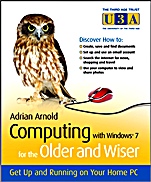
Computing with Windows 7 for the Older and Wiser: Get Up and Running on Your Home PC
ISBN 9780470687031
Autor: Adrian Arnold
Wydawca: Wiley
Dostępność: 3-6 tygodni
Cena: 114,45 zł
Przed złożeniem zamówienia prosimy o kontakt mailowy celem potwierdzenia ceny.
ISBN13: |
9780470687031 |
ISBN10: |
0470687037 |
Autor: |
Adrian Arnold |
Oprawa: |
Paperback |
Rok Wydania: |
2010-01-26 |
Ilość stron: |
340 |
Wymiary: |
209x173 |
Tematy: |
UH |
Computing with Windows® 7 for the Older & Wiser is a user friendly guide that takes you step–by–step through the basics of using a computer. Written in an easy–to–understand, jargon free language, it is aimed at complete beginners using PCs running on Microsoft Windows® 7.
Inside, you will find step–by–step guidance on:Using the keyboard & the mouseNavigating files and foldersCustomising your desktopUsing Email and the InternetWord processingOrganising your digital photosSafely downloading files from the InternetFinding useful websites and much more
Spis treści:
Chapter 1: Introduction
Age Considerations
Stretching the Mind
Guardian Angels
The Uses of a Home Computer
Using the Internet
Communications
Information
Shopping
Hobbies
Sports
Holidays
Fears of Using a Computer
Financial Security on the Internet
Equipment Needed
How to Use This Book
Part I: Basic Computing
Chapter 2: Getting to Know The computer screen, keyboard, and mouse
The Computer on
The Computer Screen: Desktop
The Keyboard
The Computer Mouse
Turning the Computer Off
Chapter 3: Introducing Windows
The Anatomy of a Window
Chapter 4: Navigating Drives, Folders, and Files
Disks and Drives
Memory and Storage
Libraries, Folders and Files
Navigation
The Address Bar
Favorites
Chapter 5: Getting to Know Your Windows 7 Desktop
Personalising your desktop with Themes
Changing the Mouse Pointer
Gadgets and Side bar
Start Menu
Creating and Deleting Shortcuts
Task Bar
Windows ExplorerChapter 6: Opening your first program: Word Processing
Cursor and Pointer
Selecting Text
Formatting
Dropdown Menus
Inserting Text
The Backspace and Delete keys
Saving your Work
Quick Access Toolbar
Chapter 7: Getting help
Windows Help Facility
Chapter 8: Installing Software
Getting Started
Installing a Program
Copyright Issues
Part II: The Internet and Email
Chapter 9: Understanding Email and Internet concepts
The concept
Choosing an ISP
Type of Service
No such thing as a free service
Dial–up and Broadband Connections
Dial–up
Broadband
Dial up versus Broadband
Wired or Wireless
Setting Up an Internet Connection
Registration Window
Usernames
Passwords
Chapter 10: introducing The Internet and World Wide Web
Using Internet Explorer
Setting your home page
Using the web– a couple of practical lessons
Alternative web browsers
Chapter 11: Finding Things Online
Search Engines
Other Search Engines
Metasearch Engines
Directories
Finding Answers to your questions
Just a Note about YouTube
Chapter 12: Shopping Online
Economics of the Web
Buying on the Internet
Price Comparison Websites
Chapter 13: Booking Travel Online
No Ticket Booking
Other Forms of Travel
Chapter 14: Buying and Selling on Internet auctions
eBay
PayPal
Registration
Buying on eBay
Selling on eBay
Chapter 15: Downloading a Program from the Web
Types of Software
Downloading and Insta
lling Picasa
Chapter 16: Using Email
The concept
Installing Windows Live Mail
Opening Windows Live Mail
Receiving emails
Part III: Advanced techniquesChapter 17: Getting Started with Digital Photography
Transferring photos from Camera to computer
Scanning photos
Using Digital Photo Services on the Web
Improving your photos
Microsoft Imaging Tools
Storage and Backup
Storage on the Web
Commercial Software
Chapter 18: Advanced Word Processing
Quick Access Toolbar
Formatting
Useful Tips
Chapter 19: Advanced Email
Junk Mail
Viruses and Other Nasties
Sorting Your Messages
Other Email Tools
Email on the Internet
Additional Email AddressesChapter 20: Advanced Uses of the Internet
Alternative Web Browsers
Browser Toolbars
Google Tools
Listening to the Radio on your Computer
Blogging
Chapter 21: Using Windows Live Essentials
Downloading Live Essentials
Part 4: Appendices
Appendix and Glossary
Glossary
Koszyk
Książek w koszyku: 0 szt.
Wartość zakupów: 0,00 zł
Informacje


Kontakt
Gambit
Centrum Oprogramowania
i Szkoleń Sp. z o.o.
Al. Pokoju 29b/22-24
31-564 Kraków
Siedziba Księgarni
ul. Kordylewskiego 1
31-542 Kraków
+48 12 410 5991
+48 12 410 5987
+48 12 410 5989
Subskrypcje
Administratorem danych osobowych jest firma Gambit COiS Sp. z o.o. Na podany adres będzie wysyłany wyłącznie biuletyn informacyjny.
Autoryzacja płatności

Informacje na temat autoryzacji płatności poprzez PayU.

© Copyright 2012: GAMBIT COiS Sp. z o.o. Wszelkie prawa zastrzeżone.
Projekt i wykonanie: Alchemia Studio Reklamy