


Wydawcy
Katalog tematyczny
- Archeologia (109)
- Ekonomia, finanse, business (13704)
- Filozofia (1445)
- Historia (3040)
- Języki i językoznawstwo (2356)
- Lifestyle, hobby i rozrywka (475)
- Medycyna (9704)
- Nauki humanistyczne (4)
- Nauki o Ziemi i środowisku (2638)
- Nauki ścisłe (20412)
- Nauki społeczne (8486)
- Nauki techniczne (13450)
- Prawo (1696)
- Publikacje informacyjne i interdyscyplinarne (1288)
- Religia i wierzenia (917)
- Technika komputerowa (4067)
- Bazy danych (75)
- Bezpieczeństwo komputerowe (454)
- Certyfikacja komputerowa (1)
- Grafika i media cyfrowe (32)
- Informatyka (779)
- Komputery, ogólnie (74)
- Programowanie (351)
- Programy komercyjne (49)
- Sieci komputerowe (350)
- Sprzęt komputerowy (4)
- Systemy operacyjne (32)
- Technika cyfrowa na co dzień (7)
- Zdrowie, relacje międzyludzkie i rozwój osobisty (657)





Informacje szczegółowe o książce
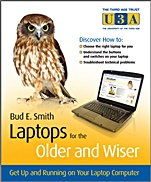
Laptops for the Older and Wiser: Get Up and Running on Your Laptop Computer
ISBN 9780470685969
Autor: Bud E. Smith
Wydawca: Wiley
Dostępność: 3-6 tygodni
Cena: 114,45 zł
Przed złożeniem zamówienia prosimy o kontakt mailowy celem potwierdzenia ceny.
ISBN13: |
9780470685969 |
ISBN10: |
0470685964 |
Autor: |
Bud E. Smith |
Oprawa: |
Paperback |
Rok Wydania: |
2010-03-19 |
Ilość stron: |
286 |
Wymiary: |
209x176 |
Tematy: |
UH |
If you are thinking of purchasing a Laptop but don’t know where to start, or you already have a Laptop but are not sure how to use it, then this user–friendly guide can help.
Laptops for the Older and Wiser is designed for those looking for straightforward advice on getting the best out of laptops and the mobile computing experience.
You will find step–by–step guidance on:
· Choosing which laptop is right for you
· Purchasing your laptop and getting through the setup experience
· Understanding the various connections, buttons and switches
· Getting connected wirelessly at home or abroad
· Staying safe online with your laptop and much more…
Spis treści:
Chapter 1– Introduction.How this book is structured.
Challenging old beliefs.
Challenging fears.
Part I: Getting Your Laptop.
Chapter 2: Choosing the Right Laptop for You.
Choosing the computer size.
Where to get advice.
Choosing the type of computer .
Summary.
Chapter 3: Understanding Laptop Specifications.
The Parts you can see and feel.
The parts you can’t see.
Printer specifications.
Summary.
Chapter 4: Buying Your Laptop.
Setting your budget.
Shopping online for a laptop.
Finding a laptop in the shops .
Summary.
Part II: Setup.
Chapter 5: Buying Broadband.
Choosing a broadband provider.
Buying your laptop in a package deal.
Summary.
Chapter 6: Bringing Your Laptop Home.
Setting your laptop up at home.
Making sure everything works.
Deleting software.
Loading software.
Summary.
Chapter 7: Customizing the Desktop.
Touring the desktop.
Control panel.
Summary.
Part III: Getting Up and Running.
Chapter 8: Getting Power to the People.
How your laptop uses power.
Using power management.
Getting plugged in.
Summ
ary.
Chapter 9: Staying Connected.
Wireless connections at home and away.
Finding and choosing a wireless connection.
Alternatives to a wireless network.
Summary.
Chapter 10: Using Your Laptop’s Software.
Using Accessories.
Using word processing and spreadsheets.
Summary.
Chapter 11: Learning What You Can Do Online.
Using email.
Using online search.
Finding videos, music and more online.
Summary.
Chapter 12: Preventing Problems.
Preventing loss or theft.
Preventing damage.
Preventing freezes and slowdowns.
Preventing loss of data.
Summary.
Part IV: Glossary.
Glossary.
Index
Okładka tylna:
If you are thinking of purchasing a Laptop but don’t know where to start, or you already have a Laptop but are not sure how to use it, then this user–friendly guide can help.
Laptops for the Older and Wiser is designed for those looking for straightforward advice on getting the best out of laptops and the mobile computing experience.
You will find step–by–step guidance on:
· Choosing which laptop is right for you
· Purchasing your laptop and getting through the setup experience
· Understanding the various connections, buttons and switches
· Getting connected wirelessly at home or abroad
· Staying safe online with your laptop and much more…
Koszyk
Książek w koszyku: 0 szt.
Wartość zakupów: 0,00 zł
Informacje


Kontakt
Gambit
Centrum Oprogramowania
i Szkoleń Sp. z o.o.
Al. Pokoju 29b/22-24
31-564 Kraków
Siedziba Księgarni
ul. Kordylewskiego 1
31-542 Kraków
+48 12 410 5991
+48 12 410 5987
+48 12 410 5989
Subskrypcje
Administratorem danych osobowych jest firma Gambit COiS Sp. z o.o. Na podany adres będzie wysyłany wyłącznie biuletyn informacyjny.
Autoryzacja płatności

Informacje na temat autoryzacji płatności poprzez PayU.

© Copyright 2012: GAMBIT COiS Sp. z o.o. Wszelkie prawa zastrzeżone.
Projekt i wykonanie: Alchemia Studio Reklamy