


Wydawcy
Katalog tematyczny
- Archeologia (109)
- Ekonomia, finanse, business (13704)
- Filozofia (1445)
- Historia (3040)
- Języki i językoznawstwo (2356)
- Lifestyle, hobby i rozrywka (475)
- Medycyna (9704)
- Nauki humanistyczne (4)
- Nauki o Ziemi i środowisku (2638)
- Nauki ścisłe (20412)
- Nauki społeczne (8486)
- Nauki techniczne (13450)
- Prawo (1696)
- Publikacje informacyjne i interdyscyplinarne (1288)
- Religia i wierzenia (917)
- Technika komputerowa (4067)
- Bazy danych (75)
- Bezpieczeństwo komputerowe (454)
- Certyfikacja komputerowa (1)
- Grafika i media cyfrowe (32)
- Informatyka (779)
- Komputery, ogólnie (74)
- Programowanie (351)
- Programy komercyjne (49)
- Sieci komputerowe (350)
- Sprzęt komputerowy (4)
- Systemy operacyjne (32)
- Technika cyfrowa na co dzień (7)
- Zdrowie, relacje międzyludzkie i rozwój osobisty (657)





Informacje szczegółowe o książce
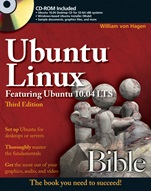
Ubuntu Linux Bible: Featuring Ubuntu 10.04 LTS
ISBN 9780470604502
Autor: William von Hagen
Wydawca: Wiley
Dostępność: 3-6 tygodni
Cena: 227,85 zł
Przed złożeniem zamówienia prosimy o kontakt mailowy celem potwierdzenia ceny.
ISBN13: |
9780470604502 |
ISBN10: |
0470604506 |
Autor: |
William von Hagen |
Oprawa: |
Paperback |
Rok Wydania: |
2010-06-04 |
Numer Wydania: |
3rd Edition |
Ilość stron: |
1224 |
Wymiary: |
232x188 |
Tematy: |
UH |
Everything you need to know about Ubuntu—and then some!
Ubuntu Linux is hotter than ever, and now you can jump in with Ubuntu 9.10 or 10.04 and this information–packed guide. Want to set up text files? Use the GNOME desktop or command–line tools? Create a virtualized machine? Set up mail, Samba, or NFS servers? Thoroughly covering everything from the basics for newcomers to the essentials for all users to practical enterprise management for system administrators, this is the Ubuntu book you need to succeed.
Master Ubuntu fundamentals for desktop and servers
Use the GNOME® desktop and the Compiz Window Manager
Manage your e–mail, contacts, calendar, IM, and Web access
Work with the Bash shell and the command line
Go wireless or create virtual machines with VirtualBox or KVM
Manage users and groups and set up Kerberos authentication
Set up Web, mail, print, Samba, NFS, and other servers
Play games and work with multimedia
What′s on the CD–ROM?
Test–drive Ubuntu 10.04 on your existing system without changing a thing using the Ubuntu Desktop CD included with this book. If you decide to install Ubuntu permanently, there is also an easy–to–use installer provided. The CD also includes:
A special installer for installing Ubuntu on a system running Microsoft Windows, without having to re–partition the disk
Sample documents, graphics files, and more to help you get the most out of Ubuntu
CD–ROM Included
Ubuntu 10.04 Desktop CD for 32–bit x86 systems
Windows–based Ubuntu Installer (Wubi)
Sample documents, graphics files, and more
System Requirements: Please see Appendix A in the book for details and complete system requirements.
Set up Ubuntu for desktops or servers
Thoroughly master the
fundamentals
Get the most out of your graphics, audio, and video
Spis treści:
Introduction.
Part I: Getting Started With Ubuntu and Kubuntu.
Chapter 1: The Ubuntu Linux Project.
Chapter 2: Installing Ubuntu.
Chapter 3: Installing Ubuntu on Special–Purpose Systems.
Part II: Ubuntu for DesktopUsers.
Chapter 4: Basic Linux System Concepts.
Chapter 5: Using the GNOME Desktop.
Chapter 6: Using the Compiz WindowManager.
Chapter 7: Managing E–Mail and Personal Information withEvolution.
Chapter 8: Surfing the Web with Firefox.
Chapter 9: Migrating from WindowsSystems.
Chapter 10: Sending and Receiving Instant Messages.
Chapter 11: Using Command–Line Tools.
Chapter 12: Working with Text Files.
Chapter 13: Creating and PublishingDocuments.
Chapter 14: Other Office Software: Spreadsheets and Presentations.
Chapter 15: Working with Graphics.
Chapter 16: Working with Multimedia.
Chapter 17: Would You Like to Play a Game?
Chapter 18: Consumer Electronics and Ubuntu.
Chapter 19: Adding, Removing, and Updating Software.
Chapter 20: Adding Hardware and Attaching Peripherals.
Chapter 21: Network Configuration andSecurity.
Chapter 22: Going Wireless.
Chapter 23: Software Development onUbuntu.
Chapter 24: Using Virtual Machines andEmulators.
Chapter 25: Connecting to Other Systems.
Chapter 26: File Transfer and Sharing.
Part III: Ubuntu for System Administrators.
Chapter 27: Managing Users, Groups, and Authentication.
Chapter 28: Backing Up and RestoringFiles.
Chapter 29: Setting Up a Web Server.
Chapter 30: Setting Up a Mail Server.
Chapter 31: Setting Up a DHCP Server.
Chapter 32: Setting Up a DNS Server.
Chapter 33: Setting Up a Print Server.
Chapter 34: Setting Up an NFS Server.
Chapter 35: Setting Up a Samba Server.
Appendix: What′s on the CD–ROM?
Index.
Okładka tylna:
Everything you need to know about Ubuntu—and then some!
Ubuntu Linux is hotter than ever, and now you can jump in with Ubuntu 9.10 or 10.04 and this information–packed guide. Want to set up text files? Use the GNOME desktop or command–line tools? Create a virtualized machine? Set up mail, Samba, or NFS servers? Thoroughly covering everything from the basics for newcomers to the essentials for all users to practical enterprise management for system administrators, this is the Ubuntu book you need to succeed.
Master Ubuntu fundamentals for desktop and servers
Use the GNOME® desktop and the Compiz Window Manager
Manage your e–mail, contacts, calendar, IM, and Web access
Work with the Bash shell and the command line
Go wireless or create virtual machines with VirtualBox or KVM
Manage users and groups and set up Kerberos authentication
Set up Web, mail, print, Samba, NFS, and other servers
Play games and work with multimedia
What′s on the CD–ROM?
Test–drive Ubuntu 10.04 on your existing system without changing a thing using the Ubuntu Desktop CD included with this book. If you decide to install Ubuntu permanently, there is also an easy–to–use installer provided. The CD also includes:
A special installer for installing Ubuntu on a system running Microsoft Windows, without having to re–partition the disk
Sample documents, graphics files, and more to help you get the most out of Ubuntu
CD–ROM Included
Ubuntu 10.04 Desktop CD for 32–bit x86 systems
Windows–based Ubuntu Installer (Wubi)
Sample documents, graphics files, and more
System Requirements: Please see Appendix A in the book for details and complete system requirements.
Set up Ubuntu for desktops or servers
Thoroughly maste
r the fundamentals
Get the most out of your graphics, audio, and video
Koszyk
Książek w koszyku: 0 szt.
Wartość zakupów: 0,00 zł
Informacje


Kontakt
Gambit
Centrum Oprogramowania
i Szkoleń Sp. z o.o.
Al. Pokoju 29b/22-24
31-564 Kraków
Siedziba Księgarni
ul. Kordylewskiego 1
31-542 Kraków
+48 12 410 5991
+48 12 410 5987
+48 12 410 5989
Subskrypcje
Administratorem danych osobowych jest firma Gambit COiS Sp. z o.o. Na podany adres będzie wysyłany wyłącznie biuletyn informacyjny.
Autoryzacja płatności

Informacje na temat autoryzacji płatności poprzez PayU.

© Copyright 2012: GAMBIT COiS Sp. z o.o. Wszelkie prawa zastrzeżone.
Projekt i wykonanie: Alchemia Studio Reklamy