


Wydawcy
Katalog tematyczny
- Archeologia (109)
- Ekonomia, finanse, business (13704)
- Filozofia (1445)
- Historia (3040)
- Języki i językoznawstwo (2356)
- Lifestyle, hobby i rozrywka (475)
- Medycyna (9704)
- Nauki humanistyczne (4)
- Nauki o Ziemi i środowisku (2638)
- Nauki ścisłe (20412)
- Nauki społeczne (8486)
- Nauki techniczne (13450)
- Prawo (1696)
- Publikacje informacyjne i interdyscyplinarne (1288)
- Religia i wierzenia (917)
- Technika komputerowa (4067)
- Bazy danych (75)
- Bezpieczeństwo komputerowe (454)
- Certyfikacja komputerowa (1)
- Grafika i media cyfrowe (32)
- Informatyka (779)
- Komputery, ogólnie (74)
- Programowanie (351)
- Programy komercyjne (49)
- Sieci komputerowe (350)
- Sprzęt komputerowy (4)
- Systemy operacyjne (32)
- Technika cyfrowa na co dzień (7)
- Zdrowie, relacje międzyludzkie i rozwój osobisty (657)






Informacje szczegółowe o książce
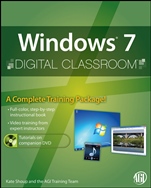
Windows 7 Digital Classroom: (Book and Video Training)
ISBN 9780470568026
Autor: Kate Shoup, AGI Creative Team
Wydawca: Wiley
Dostępność: 3-6 tygodni
Cena: 233,10 zł
Przed złożeniem zamówienia prosimy o kontakt mailowy celem potwierdzenia ceny.
ISBN13: |
9780470568026 |
ISBN10: |
047056802X |
Autor: |
Kate Shoup, AGI Creative Team |
Oprawa: |
Paperback |
Rok Wydania: |
2010-01-15 |
Ilość stron: |
560 |
Wymiary: |
232x188 |
Tematy: |
UH |
You have a personal tutor in the Digital Classroom
If you want expert instruction that fits into your schedule, Digital Classroom delivers. Software experts and master teachers guide you through 15 lessons, helping you learn Windows 7 at your own speed. Full–color, step–by–step instructions in the book are enhanced with video tutorials on the DVD. With Digital Classroom, you have your own private instructor showing you the easiest way to learn essential Windows 7 skills.
Start Windows 7, navigate the desktop, and personalize your computer
Use basic programs, work with files and folders, and customize settings
Use Windows Live applications to share and edit digital images
Set up Windows Live Mail and Messenger for e–mail and IM
Connect your computer to the Internet and share files and folders
Work with photos, music, and movies
Maintain and secure your PC and Windows 7
Spis treści:
Starting Up.
Lesson 1: Getting Started with Windows 7.
Lesson 2: Working with Windows 7 Programs.
Lesson 3: Working with Files and Folders.
Lesson 4: Customizing Windows 7.
Lesson 5: Surfi ng the Web with Internet Explorer 8.
Lesson 6: Enjoying Audio and Video with Windows 7.
Lesson 7: Maintaining Windows 7.
Lesson 8: Setting Up User Accounts.
Lesson 9: Networking Your Computer.
Lesson 10: Securing Your Computer.
Lesson 11: Getting Organized with Windows 7.
Lesson 12: Communicating via E–mail and IM.
Lesson 13: Working with images.
Lesson 14: Using Windows 7 on a Laptop or Netbook Computer.
Appendix.
Nota biograficzna:
Kate Shoup is a versatile writer who authored Office 2007: Top 100 Simplified Tips & Tricks and coauthored Windows Vista Visual Encyclopedia. The AGI Training Team develops and delivers training programs on a variety of software applications and platforms
. Their instructors have delivered training at Microsoft′s headquarters and their content has been featured on Microsoft.com.
Okładka tylna:
You have a personal tutor in the Digital Classroom
If you want expert instruction that fits into your schedule, Digital Classroom delivers. Software experts and master teachers guide you through 15 lessons, helping you learn Windows 7 at your own speed. Full–color, step–by–step instructions in the book are enhanced with video tutorials on the DVD. With Digital Classroom, you have your own private instructor showing you the easiest way to learn essential Windows 7 skills.
Start Windows 7, navigate the desktop, and personalize your computer
Use basic programs, work with files and folders, and customize settings
Use Windows Live applications to share and edit digital images
Set up Windows Live Mail and Messenger for e–mail and IM
Connect your computer to the Internet and share files and folders
Work with photos, music, and movies
Maintain and secure your PC and Windows 7
Koszyk
Książek w koszyku: 0 szt.
Wartość zakupów: 0,00 zł
Informacje


Kontakt
Gambit
Centrum Oprogramowania
i Szkoleń Sp. z o.o.
Al. Pokoju 29b/22-24
31-564 Kraków
Siedziba Księgarni
ul. Kordylewskiego 1
31-542 Kraków
+48 12 410 5991
+48 12 410 5987
+48 12 410 5989
Subskrypcje
Administratorem danych osobowych jest firma Gambit COiS Sp. z o.o. Na podany adres będzie wysyłany wyłącznie biuletyn informacyjny.
Autoryzacja płatności

Informacje na temat autoryzacji płatności poprzez PayU.

© Copyright 2012: GAMBIT COiS Sp. z o.o. Wszelkie prawa zastrzeżone.
Projekt i wykonanie: Alchemia Studio Reklamy