


Wydawcy
Katalog tematyczny
- Archeologia (109)
- Ekonomia, finanse, business (13704)
- Filozofia (1445)
- Historia (3040)
- Języki i językoznawstwo (2356)
- Lifestyle, hobby i rozrywka (475)
- Medycyna (9704)
- Nauki humanistyczne (4)
- Nauki o Ziemi i środowisku (2638)
- Nauki ścisłe (20412)
- Nauki społeczne (8486)
- Nauki techniczne (13450)
- Prawo (1696)
- Publikacje informacyjne i interdyscyplinarne (1288)
- Religia i wierzenia (917)
- Technika komputerowa (4067)
- Bazy danych (75)
- Bezpieczeństwo komputerowe (454)
- Certyfikacja komputerowa (1)
- Grafika i media cyfrowe (32)
- Informatyka (779)
- Komputery, ogólnie (74)
- Programowanie (351)
- Programy komercyjne (49)
- Sieci komputerowe (350)
- Sprzęt komputerowy (4)
- Systemy operacyjne (32)
- Technika cyfrowa na co dzień (7)
- Zdrowie, relacje międzyludzkie i rozwój osobisty (657)





Informacje szczegółowe o książce
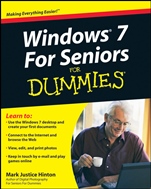
Windows 7 For Seniors For Dummies
ISBN 9780470509463
Autor: Mark Justice Hinton
Wydawca: Wiley
Dostępność: 3-6 tygodni
Cena: 142,80 zł
Przed złożeniem zamówienia prosimy o kontakt mailowy celem potwierdzenia ceny.
ISBN13: |
9780470509463 |
ISBN10: |
0470509465 |
Autor: |
Mark Justice Hinton |
Oprawa: |
Paperback |
Rok Wydania: |
2009-09-11 |
Ilość stron: |
408 |
Wymiary: |
236x191 |
Tematy: |
UH |
Windows® 7 For Seniors for Dummies
Learn to:
Use the Windows 7 desktop and create your first documents
Connect to the Internet and browse the Web
View, edit, and print photos
Keep in touch by e–mail and play games online
Mark Justice Hinton
Author of Digital Photography For Seniors For Dummies
You can learn to use Windows, get online, and start doing things today!
You don′t need a grandchild to teach you Windows 7 — with this friendly guide, you′ll be using the mouse, working with folders, hooking up a printer, and cruising the Internet in nothing flat. Learn to use all the gizmos that come with Windows 7, shop online, view a slideshow of your favorite photos, send e–mail to a friend, enjoy music, and more!
Tour the desktop — learn to use menus, the Start menu button, files, and folders
Do it — create notes and letters, connect a printer, download photos from your digital camera, and put music on a CD
Have some fun — discover Solitaire and other built–in games, listen to music, and watch a movie
Use the accessories — display Gadgets on your desktop, draw with Paint, and use the Calculator
To keep or not — install additional programs you want and remove those you don′t need
Protect your Windows — learn to use the Action Center, download and install virus protection software, and keep it up to date
Have it your way — make your screen easier to see, open files with a single click, and even have your computer read to you
The wide, wide Web — shop and explore online and learn to stay safe
Open the book and find:
What′s on the taskbar
Directions for creating and saving documents
Steps for installing a printer and other peripherals
How to connect to th
e Internet anywhere
Backgammon and other games you can play online
Guidance on protecting your computer from viruses
How to send e–mail attachments
Advice on backing up documents and photos
Spis treści:
Introduction.
Part I: Getting to Know Windows 7.
1: Getting Comfortable with the Windows 7 Desktop.
2: Examining the Anatomy of a Window.
3: Creating Your First Documents.
4: Organizing Your Documents.
Part II: Getting Things Done in Windows 7.
5: Taking Advantage of the Windows Accessories.
6: Installing and Removing Programs.
7: Working with Printers and Other Add–On Devices.
Part III: Discovering the Internet.
8: Connecting to the Internet.
9: Finding What You Need on the Web.
10: Sending and Receiving E–Mail.
Part IV: Having Fun with Windows 7.
11: Playing Games.
12: Enjoying Photos in Windows 7.
13: Listening to Music and Watching DVDs.
Part V: Having It Your Way with Windows 7.
14: Making Windows 7 More Fun to Use.
15: Using the Taskbar and Start Menu Smartly.
16: Making Windows 7 Easier to Use.
Part VI: Staying Safe and Keeping Windows 7 Healthy.
17: Updating Windows 7.
18: Protecting Your Computer.
19: Keeping Your Data Safe.
Index.
Nota biograficzna:
Mark Justice Hinton teaches all kinds of technology from digital photography to HTML. He maintains a blog at www.mjhinton.com/help where he answers questions from his readers, and he is also the author of Digital Photography For Seniors For Dummies.
Okładka tylna:
Windows® 7 For Seniors for Dummies
Learn to:
Use the Windows 7 desktop and create your first documents
Connect to the Internet and browse the Web
View, edit, and print photos
Keep in touch by e–mail and play games on
line
Mark Justice Hinton
Author of Digital Photography For Seniors For Dummies
You can learn to use Windows, get online, and start doing things today!
You don′t need a grandchild to teach you Windows 7 — with this friendly guide, you′ll be using the mouse, working with folders, hooking up a printer, and cruising the Internet in nothing flat. Learn to use all the gizmos that come with Windows 7, shop online, view a slideshow of your favorite photos, send e–mail to a friend, enjoy music, and more!
Tour the desktop — learn to use menus, the Start menu button, files, and folders
Do it — create notes and letters, connect a printer, download photos from your digital camera, and put music on a CD
Have some fun — discover Solitaire and other built–in games, listen to music, and watch a movie
Use the accessories — display Gadgets on your desktop, draw with Paint, and use the Calculator
To keep or not — install additional programs you want and remove those you don′t need
Protect your Windows — learn to use the Action Center, download and install virus protection software, and keep it up to date
Have it your way — make your screen easier to see, open files with a single click, and even have your computer read to you
The wide, wide Web — shop and explore online and learn to stay safe
Open the book and find:
What′s on the taskbar
Directions for creating and saving documents
Steps for installing a printer and other peripherals
How to connect to the Internet anywhere
Backgammon and other games you can play online
Guidance on protecting your computer from viruses
How to send e–mail attachments
Advice on backing up documents and photos
Koszyk
Książek w koszyku: 0 szt.
Wartość zakupów: 0,00 zł
Informacje


Kontakt
Gambit
Centrum Oprogramowania
i Szkoleń Sp. z o.o.
Al. Pokoju 29b/22-24
31-564 Kraków
Siedziba Księgarni
ul. Kordylewskiego 1
31-542 Kraków
+48 12 410 5991
+48 12 410 5987
+48 12 410 5989
Subskrypcje
Administratorem danych osobowych jest firma Gambit COiS Sp. z o.o. Na podany adres będzie wysyłany wyłącznie biuletyn informacyjny.
Autoryzacja płatności

Informacje na temat autoryzacji płatności poprzez PayU.

© Copyright 2012: GAMBIT COiS Sp. z o.o. Wszelkie prawa zastrzeżone.
Projekt i wykonanie: Alchemia Studio Reklamy