


Wydawcy
Katalog tematyczny
- Archeologia (109)
- Ekonomia, finanse, business (13704)
- Filozofia (1445)
- Historia (3040)
- Języki i językoznawstwo (2356)
- Lifestyle, hobby i rozrywka (475)
- Medycyna (9704)
- Nauki humanistyczne (4)
- Nauki o Ziemi i środowisku (2638)
- Nauki ścisłe (20412)
- Nauki społeczne (8486)
- Nauki techniczne (13450)
- Prawo (1696)
- Publikacje informacyjne i interdyscyplinarne (1288)
- Religia i wierzenia (917)
- Technika komputerowa (4067)
- Bazy danych (75)
- Bezpieczeństwo komputerowe (454)
- Certyfikacja komputerowa (1)
- Grafika i media cyfrowe (32)
- Informatyka (779)
- Komputery, ogólnie (74)
- Programowanie (351)
- Programy komercyjne (49)
- Sieci komputerowe (350)
- Sprzęt komputerowy (4)
- Systemy operacyjne (32)
- Technika cyfrowa na co dzień (7)
- Zdrowie, relacje międzyludzkie i rozwój osobisty (657)





Informacje szczegółowe o książce
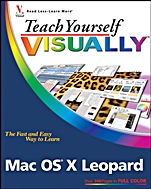
Teach Yourself VISUALLY Mac OS X Leopard
ISBN 9780470101674
Autor: Lynette Kent
Wydawca: Wiley
Dostępność: 3-6 tygodni
Cena: 152,25 zł
Przed złożeniem zamówienia prosimy o kontakt mailowy celem potwierdzenia ceny.
ISBN13: |
9780470101674 |
ISBN10: |
0470101679 |
Autor: |
Lynette Kent |
Oprawa: |
Paperback |
Rok Wydania: |
2007-10-19 |
Ilość stron: |
352 |
Wymiary: |
234x189 |
Tematy: |
UH |
Are you a visual learner? Do you prefer instructions that show you how to do something — and skip the long–winded explanations? If so, then this book is for you. Open it up, and you will find clear, step–by–step screen shots that show you how to tackle more than 150 Mac OS X Leopard tasks. Each task–based spread includes easy, visual directions for performing necessary operations, includingAdding applications to the Dock
Color–coding files and folders
Viewing windows in Exposé
Using the QuickTime player
Storing files on your iPod
Creating your own Web widgets
Helpful sidebars offer practical tips and tricks
Full–color screen shots demonstrate each task
Succinct explanations walk you through step by step
Two–page lessons break big topics into bite–sized modules
Spis treści:
Chapter 1: Getting Started with Mac OS X Leopard Fundamentals.
Introducing Mac OS X.
Installing Leopard.
Start Up the Computer.
Click, Double–Click, or Click and Drag.
Understanding the Mac Interface.
Control the Mac with Menus.
Open, Close, and Resize Windows on the Desktop.
Change Your View.
Create and Name a Folder.
Logging In and Out.
Put Your Mac to Sleep.
Restart or Shut Down the Mac.
Using the Help Menu.
Chapter 2: Working with Separate Applications.
Understanding Applications.
Install an Application.
Start and Quit an Application.
Using the Dock to Start and Quit an Application.
Add a Favorite Application to the Dock.
Using a Stack to Access Applications.
Toggle between Running Applications.
Chapter 3: Mastering the Finder.
Find the Home Folder.
Using Contextual Menus.
Using the Sidebar.
Customize the Finder.
See All Your Windows with Exposé.
Get Information about Files.
Get Information about Your Mac and Sy
stem.
Customize Icons.
Color–Code Your Files and Folders.
Duplicate Files.
Delete Files.
Using Keyboard Shortcuts.
Compress Files.
Take a Quick Look at Your Files.
Chapter 4:Customizing Leopard.
Understanding Preferences.
Change the Appearance of the Mac Interface.
Customize Your Desktop Background.
Select a Screen Saver.
Personalize the Dock.
Set Up a Corner to Activate Viewing All Windows in Exposé.
Display the Keyboard Viewer.
Speed Up Your Spotlight Searches.
Make Bluetooth Devices Interact with Your Mac.
Set the Default Behaviors of CDs and DVDs.
Adjust the Display Settings.
Schedule Sleep.
Adjust the Keyboard and Mouse.
Create an Account.
Set the Date and Time.
Customize the Appearance of the Clock.
Update Your Software Automatically.
Make Your Mac Speak.
Control Your Mac with Voice Commands.
Control the Zoom and Contrast of Your Screen.
Chapter 5: Using Leopard Applications for Everyday Tasks.
Find Items on Your Computer with Spotlight.
Preview Files Quickly.
Personalize the Preview Application.
Add a Contact to the Address Book.
Organize Your Contacts.
Find an Address on a Map.
Using the Calculator.
Track Your Schedule.
Subscribe to a Calendar.
Using iCal to Manage Your Work and Home Life.
Write and Style a Document with TextEdit.
Consult the Dictionary.
Capture a Screenshot.
Keep Your Projects Organized with Spaces.
Customize Your Personal Space.
Chapter 6: Harnessing the Power of the Internet.
Surf the Web with Safari.
Block Pop–up Windows.
Search Using Google.
Organize Web Sites with Bookmarks.
Using Tabbed Browsing.
View RSS Feeds.
Save a Web Page.
Customize Your Email Accounts.
Create and Send an Email Message.
Work with Email Attachments.
Delete an Email Message.
Personalize Your Emails with Stationery.
Using Mail Notes.
Reduce Spam in Your
Inbox .
Chapter 7: Connecting Peripherals to Your Mac.
Introducing Input and Output Devices.
Install Drivers for Accessory Devices.
Attaching Multiple Peripheral Devices.
Control Your Mac with a Pen Instead of a Mouse.
Add a Printer.
Print Documents.
Mount a Laptop As a Disk Drive and Copy Its Files.
Start Your Mac from a Different Drive or a CD/DV.
Copy Music to an iPod.
Store Files on an iPod.
Using an External Microphone with iChat.
Conduct a Video Chat with an External Video Camera.
Chapter 8: Listening to Music, Radio, and Podcasts.
Preview Music from the Finder.
Listen to Music with the QuickTime Player.
Listen to Music with iTunes.
Import Your Audio CDs.
Rip Music Files in a Different File Format and Location.
Build a Playlist.
Create a Smart Playlist.
Browse Your Music Collection.
Burn a Music CD.
Back Up Your iTunes Library.
Print a CD Case Insert.
Share Music on a Network.
Search for Educational Podcasts and Videos.
Listen to Online Radio Stations.
Chapter 9: Working with Images and Video.
Transfer Images to Your Computer.
Preview Images Quickly.
Convert Images to Different Formats.
Apply Simple Effects to Photos.
Watch a Slideshow with Preview.
Take a Quick Look at an Image with the QuickTime Player.
Watch Movies with the QuickTime Player.
Watch Movies with the DVD Playe.
Have Fun Using Photo Booth.
Get More Creative with Other Applications.
Chapter 10: Connecting to Other Machines over a Network.
Understanding Networks.
Change Your Computer’s Name.
Understanding Passwords.
Change Your Password.
Edit Network Settings.
Set Up File Sharing.
Connect to Other Computers over a Local Network.
Share a Printer.
Understanding a .Mac Account.
Set Up iChat.
Send and Receive a File with iChat.
Chapter 11: Simplifying Tasks and Maintenance.
Start with Good Mac Habits.Update Your Mac OS Software.
Find a Lost Password.
Monitor Your Computer’s Activity.
Check Your S.M.A.R.T. Status.
Clean Up Your Desktop.
Make Notes with Stickies.
Access and Customize Dashboard Utilities.
Create Your Own Web Widgets.
Back Up with Time Machine.
Customize Time Machine Backups.
Chapter 12: Troubleshooting Mac Problems.
Quit Nonfunctioning Applications.
Delay an Update.
Uninstall an Application.
Delete Locked Items.
Fix Corrupt Preferences Files.
Try a Different Startup Method.
Erase Discs with Disk Utility.
Repair Disk Permissions.
Repair a Disk.
Using Third–Party Utilities.
Nota biograficzna:
Lynette Kent (Huntington Beach, CA) studied art and French at Stanford University. After completing her master’s degree, she taught at both the high school and community college level. A fervent Mac user since 1987 and unconventional computer person, she writes books and magazine articles on digital imaging and photography and enjoys presenting computer graphics hardware and software at trade shows. Her books include Photoshop CS3: Top 100 Simplified Tips & Tricks, Teach Yourself VISUALLY Digital Photography, and Scrapbooking with Photoshop Elements: The Creative Cropping Cookbook. Lynette is also one of the leaders of the Adobe Technology Exchange of Southern California, a professional organization for graphic designers, photographers, and artists.
Okładka tylna:
Are you a visual learner? Do you prefer instructions that show you how to do something — and skip the long–winded explanations? If so, then this book is for you. Open it up, and you will find clear, step–by–step screen shots that show you how to tackle more than 150 Mac OS X Leopard tasks. Each task–based spread includes easy, visual directions for performing necessary operations, includingAdding applications to
Koszyk
Książek w koszyku: 0 szt.
Wartość zakupów: 0,00 zł
Informacje


Kontakt
Gambit
Centrum Oprogramowania
i Szkoleń Sp. z o.o.
Al. Pokoju 29b/22-24
31-564 Kraków
Siedziba Księgarni
ul. Kordylewskiego 1
31-542 Kraków
+48 12 410 5991
+48 12 410 5987
+48 12 410 5989
Subskrypcje
Administratorem danych osobowych jest firma Gambit COiS Sp. z o.o. Na podany adres będzie wysyłany wyłącznie biuletyn informacyjny.
Autoryzacja płatności

Informacje na temat autoryzacji płatności poprzez PayU.

© Copyright 2012: GAMBIT COiS Sp. z o.o. Wszelkie prawa zastrzeżone.
Projekt i wykonanie: Alchemia Studio Reklamy