


Wydawcy
Katalog tematyczny
- Archeologia (109)
- Ekonomia, finanse, business (13704)
- Filozofia (1445)
- Historia (3040)
- Języki i językoznawstwo (2356)
- Lifestyle, hobby i rozrywka (475)
- Medycyna (9704)
- Nauki humanistyczne (4)
- Nauki o Ziemi i środowisku (2638)
- Nauki ścisłe (20412)
- Nauki społeczne (8486)
- Nauki techniczne (13450)
- Prawo (1696)
- Publikacje informacyjne i interdyscyplinarne (1288)
- Religia i wierzenia (917)
- Technika komputerowa (4067)
- Zdrowie, relacje międzyludzkie i rozwój osobisty (657)





Informacje szczegółowe o książce
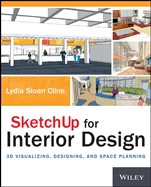
SketchUp for Interior Design: 3D Visualizing, Designing, and Space Planning
ISBN 9781118627693
Autor: Lydia Cline
Wydawca: Wiley
Dostępność: 3-6 tygodni
Cena: 274,05 zł
Przed złożeniem zamówienia prosimy o kontakt mailowy celem potwierdzenia ceny.
ISBN13: |
9781118627693 |
ISBN10: |
1118627695 |
Autor: |
Lydia Cline |
Oprawa: |
Paperback |
Rok Wydania: |
2014-03-07 |
Ilość stron: |
304 |
Wymiary: |
235x187 |
Tematy: |
AM |
SketchUp for Interior Design 3D Visualizing, Designing, and Space Planning The interior designer?s guide to harnessing the power of SketchUp Make and SketchUp Pro Already a popular tool for architects, SketchUp is now finding its way into the professional interior designer?s toolbox. This clear and practical guide shows both PC and Mac users how to use SketchUp?s tools to model interior spaces and furniture, apply manufacturer textiles and finishes, print underlays for hand rendering, and create presentations and animated walkthroughs for clients. SketchUp for Interior Design offers step–by–step guidance for beginners, covering everything from understanding the interface to creating construction documents with LayOut. Explaining the many ways interior designers can use SketchUp Make and SketchUp Pro, the book covers: Manipulating tools to model floor plans, multi–level interior spaces, and stairs Applying colors, textures, and photo–texturing Editing textures inside SketchUp with Photoshop Organizing models with layers and the Outliner Finding and editing components from the 3D Warehouse Installing plug–ins from the Extension Warehouse Manipulating dynamic components Creating a LayOut document With step–by–step tutorials and practical tips SketchUp for Interior Design: 3D Visualizing, Designing, and Space Planning will teach you how to create models that are detailed, organized, easy to work with, and manageable in size for optimal computer performance. The book includes access to online exercises, models, and 39 tutorials that expand on the book?s projects.
Foreword vii Chapter 1: What Is SketchUp and How Do Interior Designers Use It? 1 What Is SketchUp? 1 Who Uses It? 2 Is It Easy to Learn? 2 What Is SketchUp Used For? 2 The Difference between Traditional CAD Drawings and Models 2 How SketchUp Displays the Model 3 Types of Models 3 What SketchUp Make (Free Version) Can Do 4 What SketchUp Pro Can Do 5 How Designers Use SketchUp 9 Chapter 2: Getting Started 13 Hardware, Operating System, and Browser Requirements 13 The Video Card 14 The Space Navigator 3D Mouse 14 Use a Tablet PC 15 Download SketchUp Make 16 The Workspace 20 Run Multiple SketchUp Files at the Same Time 22 Save Options 23 Backup Files 24 Chapter 3: Exploring the Interface 25 Select or Change a Template 25 Add the Large Tool Set 25 The Select Tool 27 The Rectangle Tool 28 The Inference Engine 28 The Push/Pull Tool 29 Input Numbers 30 The Pan and Orbit Tools 31 The P Modifier Keys 32 The Escape Key 32 The Zoom Tool 32 The Views Toolbar: Generate Orthographic Drawings 32 Select with Selection and Crossing Windows 35 Select by Clicking, Right–Clicking, and Holding the Shift and Control Keys 36 The Move Tool 37 Customize the Desktop 38 Make a Custom Template 41 The Help Function 42 Manage Dialog Boxes 42 Chapter 4: Modeling Furniture, Cabinetry, and Accessories 45 Faces and Edges 45 The Eraser Tool and Erasing 45 The Pencil and Freehand Tools 46 The Move Tool 47 Stickiness 48 Groups 49 Causes of a Non–Filling Face 51 Color–Coordinate the Model’s Lines with the Axes by Changing the Edge Style Setting 52 Model a Table 53 Model a Bookcase 62 Model a Clock with Radial Array 79 Chapter 5: Drafting, Modeling, and Furnishing a Floor Plan 85 Prepare a Raster File for Import 85 Draft a Plan by Tracing a Raster Image 85 Trace Interior Walls 93 Edge Styles Again 94 From Plan to Model 96 Flashing Planes 100 Draft a Plan from a Paper Sketch 102 Interior vs. Exterior Models. 108 Components in Single– vs. Double–Sided Walls 108 Create Plan and Elevation Views 116 Model a Building from an AutoCAD Plan 121 Interact with Revit, 20–20, and Other Programs 124 “Clipping” (Disappearing Geometry) 125 Model a Sloped Ceiling with the Protractor Tool 125 Chapter 6: Modeling a Two–Story House Interior 131 Model the Shell and First Floor 131 Model the Second Floor 137 Model the Living Room 145 Model a Cabinet 147 Model Crown Molding with the Follow Me Tool 151 Model a Stairs Guard 155 Edit a Downloaded Staircase 156 The Outliner 164 Chapter 7: Painting with Colors, Textures, and Photo–Matching 169 What Is Painting? 169 Paint with Native SketchUp Materials 169 Paint with Textures 174 Paint the Stairs 176 Import Swatches from Other Models 178 Put New Colors and Textures into the Software 178 Check Face Orientation on Painted Surfaces with Entity Info and Face Style 180 Apply a Real–Life Design Scheme to the Model 180 Import a Texture 183 Import an Image 188 Photo–Match an Interior Space 202 Chapter 8: Enhancing and Presenting the Model 209 Annotate the Model: Dimensions and Text 209 Dimension a Floor Plan. 214 Scenes 224 The Walk–Through Tools 231 What Are Dynamic Components? 233 Save vs. Export 236 Enhance with Other Software 238 Enhance with Hand–Rendering 238 Why SketchUp May Run Slow 246 Chapter 9: Plugins and LayOut 253 What’s a Plugin? 253 LayOut 265 SketchUCation Forum 277 Index 279
Lydia Sloan Cline is a professor at Johnson County Community College, where she teaches SketchUp, AutoCAD, manual drafting, and interpreting architectural drawings. She is also the author of Architectural Drafting for Interior Designers and Drafting and Visual Presentation for Interior Designers .
Koszyk
Książek w koszyku: 0 szt.
Wartość zakupów: 0,00 zł
Informacje


Kontakt
Gambit
Centrum Oprogramowania
i Szkoleń Sp. z o.o.
Al. Pokoju 29b/22-24
31-564 Kraków
Siedziba Księgarni
ul. Kordylewskiego 1
31-542 Kraków
+48 12 410 5991
+48 12 410 5987
+48 12 410 5989
Subskrypcje
Administratorem danych osobowych jest firma Gambit COiS Sp. z o.o. Na podany adres będzie wysyłany wyłącznie biuletyn informacyjny.
Autoryzacja płatności

Informacje na temat autoryzacji płatności poprzez PayU.

© Copyright 2012: GAMBIT COiS Sp. z o.o. Wszelkie prawa zastrzeżone.
Projekt i wykonanie: Alchemia Studio Reklamy