


Wydawcy
Katalog tematyczny
- Archeologia (109)
- Ekonomia, finanse, business (13704)
- Filozofia (1445)
- Historia (3040)
- Języki i językoznawstwo (2356)
- Lifestyle, hobby i rozrywka (475)
- Medycyna (9704)
- Nauki humanistyczne (4)
- Nauki o Ziemi i środowisku (2638)
- Nauki ścisłe (20412)
- Nauki społeczne (8486)
- Nauki techniczne (13450)
- Prawo (1696)
- Publikacje informacyjne i interdyscyplinarne (1288)
- Religia i wierzenia (917)
- Technika komputerowa (4067)
- Zdrowie, relacje międzyludzkie i rozwój osobisty (657)





Informacje szczegółowe o książce
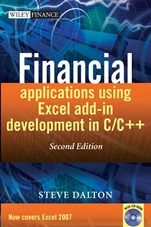
Financial Applications using Excel Add–in Development in C / C++
ISBN 9780470027974
Autor: Steve Dalton
Wydawca: Wiley
Dostępność: 3-6 tygodni
Cena: 463,05 zł
Przed złożeniem zamówienia prosimy o kontakt mailowy celem potwierdzenia ceny.
ISBN13: |
9780470027974 |
ISBN10: |
0470027975 |
Autor: |
Steve Dalton |
Oprawa: |
Hardback |
Rok Wydania: |
2007-07-27 |
Numer Wydania: |
2nd Edition |
Ilość stron: |
584 |
Wymiary: |
250x179 |
Tematy: |
KF |
Financial Applications using Excel Add–in Development in C/C++ is a must–buy book for any serious Excel developer.Excel is the industry standard for financial modelling, providing a number of ways for users to extend the functionality of their own add–ins, including VBA and C/C++. This is the only complete how–to guide and reference book for the creation of high performance add–ins for Excel in C and C++ for users in the finance industry. Steve Dalton explains how to apply Excel add–ins to financial applications with many examples given throughout the book. It also covers the relative strengths and weaknesses of developing add–ins for Excel in VBA versus C/C++, and provides comprehensive code, workbooks and example projects on the accompanying CD–ROM. The impact of Excel 2007’s multi–threaded workbook calculations and large grids on add–in development are fully explored. Financial Applications using Excel Add–in Development in C/C++ features:
Extensive example codes in VBA, C and C++, explaining all the ways in which a developer can achieve their objectives.Example projects that demonstrate, from start to finish, the potential of Excel when powerful add–ins can be easily developed.Develops the readers understanding of the relative strengths and weaknesses of developing add–ins for Excel in VBA versus C/C++.A CD–ROM with several thousand lines of example code, numerous workbooks, and a number of complete example projects.
"Financial Applications using Excel Add–in Development in C/C++ is the definitive how–to guide adn reference for developers looking to create high–performance applications in Excel using C and C++. The book provides a practical, detailed, and lucid treatment of the Excel C API and XLL add–in development, with a particular emphasis on developing worksheet functions. Author Steve Dalton does a
masterful job of sharing his many years of expertise, tackling the subject with detailed information, abundant best practice, and numerous practical examples. I would highly recommend this book to any serious Excel developer." – David Gainer, Group Program Manager, Microsoft Excel
Spis treści:
Preface to Second Edition.
Preface to First Edition.
Acknowledgements for the First Edition.
Acknowledgements for the Second Edition.
1 Introduction.
1.1 Typographical and code conventions used in this book.
1.2 What tools and resources are required to write add–ins.
1.2.1 VBA macros and add–ins.
1.2.2 C/C++ DLL add–ins.
1.2.3 C/C++ DLLs that can access the C API and XLL add–ins.
1.2.4 C/C++/C#.NET add–ins.
1.3 To which versions of Excel does this book apply?
1.4 The future of Excel: Excel 2007 (Version 12).
1.4.1 Summary of key workbook changes.
1.4.2 Aspects of Excel 2007 not covered in this book.
1.4.3 Excel 2007 file formats.
1.4.4 Compatibility between Excel 2007 and earlier versions.
1.5 About add–ins.
1.6 Why is this book needed?
1.7 How this book is organised.
1.8 Scope and limitations.
2 Excel Functionality.
2.1 Overview of Excel data organisation.
2.2 A1 versus R1C1 cell references.
2.3 Cell contents.
2.4 Worksheet data types and limits.
2.5 Excel input evaluation.
2.6 Data type conversion.
2.6.1 The unary = operator.
2.6.2 The unary – operator (negation).
2.6.3 Number–arithmetic binary operators: + – ∗/^.
2.6.4 Percentage operator: %.
2.6.5 String concatenation operator: &.
2.6.6 Boolean binary operators: =,< , >,< =, >=,< >.
2.6.7 Conversion of single–cell references.
2.6.8 Conversion of multi–cell range references.
2.6.9 Conversion of defined range names.
2.6.10 Exp
licit type conversion functions: N(), T(), TEXT(), VALUE().
2.6.11 Worksheet function argument type conversion.
2.6.12 Operator evaluation precedence.
2.7 Strings.
2.7.1 Length–prepended versus null–terminated strings.
2.7.2 Byte strings versus Unicode strings.
2.7.3 Unmanaged versus managed strings.
2.7.4 Summary of string types used in Excel.
2.7.5 Converting one string type to another.
2.7.6 Hybrid length–counted null–terminated strings.
2.8 Excel Terminology: Active and Current.
2.9 Commands versus functions in Excel.
2.10 Types of worksheet function.
2.10.1 Function purpose and return type.
2.10.2 Array formulae – The Ctrl–Shift–Enter keystroke.
2.10.3 Required, optional and missing arguments and variable argument lists.
2.11 Complex functions and commands.
2.11.1 Data Tables.
2.11.2 Goal Seek and Solver Add–in.
2.12 Excel recalculation logic.
2.12.1 Marking dependents for recalculation.
2.12.2 Triggering functions to be called by Excel – the trigger argument.
2.12.3 Volatile functions.
2.12.4 Cross–worksheet dependencies – Excel 97/2000 versus 2002 and later versions.
2.12.5 User–defined functions (VB Macros) and add–in functions.
2.12.6 Data Table recalculation.
2.12.7 Conditional formatting.
2.12.8 Argument evaluation: IF(), OR(), AND(), CHOOSE()....
2.12.9 Controlling Excel recalculation programmatically.
2.12.10 Forcing Excel to recalculate a workbook or other object.
2.12.11 Using functions in name definitions.
2.12.12 Multi–threaded recalculation.
2.13 The Add–in Manager.
2.14 Loading and unloading add–ins.
2.14.1 Add–in information.
2.15 Paste function dialog.
2.15.1 Function category.
2.15.2 Function name, argument list and description.
2.15.3 Argument construction dialog.
2.16 Good spreadsheet design and practice.
2.16.1 File
name, sheet title and name, version and revision history.
2.16.2 Magic numbers.
2.16.3 Data organisation and design guidelines.
2.16.4 Formula repetition.
2.16.5 Efficient lookups: MATCH(), INDEX() and OFFSET() versus VLOOKUP().
2.17 Problems with very large spreadsheets.
2.18 Conclusion.
3 UsingVBA.
3.1 Opening the VB editor.
3.2 Using VBA to create new commands.
3.2.1 Recording VBA macro commands.
3.3 Assigning VBA command macros to control objects in a worksheet.
3.4 Using VBA to trap Excel events.
3.5 Using VBA to create new functions.
3.5.1 Function scope.
3.5.2 Declaring VBA functions as volatile.
3.6 Using VBA as an interface to external DLL add–ins.
3.6.1 Declaring DLL functions in VB.
3.6.2 Call–by–reference versus call–by–value.
3.6.3 Converting argument and return data types between VBA and C/C++.
3.6.4 VBA data types and limits.
3.6.5 VB/OLE Currency type.
3.6.6 VB/OLE Bstr Strings.
3.6.7 Passing strings to C/C++ functions from VBA.
3.6.8 Returning strings to VBA from a DLL.
3.6.9 Variant data type.
3.6.10 Variant types supported by VBA.
3.6.11 Variant types that Excel can pass to VBA functions.
3.6.12 User–defined data types in VB.
3.6.13 VB object data type.
3.6.14 Calling XLM functions and commands from VBA: Application.ExecuteExcel4Macro().
3.6.15 Calling user–defined functions and commands from VBA: Application.Run().
3.7 Excel ranges, VB arrays, SafeArrays, array Variants.
3.7.1 Declaring VB arrays and passing them back to Excel.
3.7.2 Passing arrays and ranges from Excel to VBA to C/C++.
3.7.3 Converting array Variants to and from C/C++ types.
3.7.4 Passing VB arrays to and from C/C++.
3.8 Commands versus functions in VBA.
3.9 Creating VB add–ins (XLA files).
3.10 VBA versus C/C++: some basic questions.
4 Creating a 32–bit Windows (Win32) DLL Using Visual C++ 6.0 or
Koszyk
Książek w koszyku: 0 szt.
Wartość zakupów: 0,00 zł
Informacje


Kontakt
Gambit
Centrum Oprogramowania
i Szkoleń Sp. z o.o.
Al. Pokoju 29b/22-24
31-564 Kraków
Siedziba Księgarni
ul. Kordylewskiego 1
31-542 Kraków
+48 12 410 5991
+48 12 410 5987
+48 12 410 5989
Subskrypcje
Administratorem danych osobowych jest firma Gambit COiS Sp. z o.o. Na podany adres będzie wysyłany wyłącznie biuletyn informacyjny.
Autoryzacja płatności

Informacje na temat autoryzacji płatności poprzez PayU.

© Copyright 2012: GAMBIT COiS Sp. z o.o. Wszelkie prawa zastrzeżone.
Projekt i wykonanie: Alchemia Studio Reklamy